Product
Till and ordering, for everyone who sells over a counter.
A menu, a till and ordering ahead in one. At the till the staff tap in the items, and the customer pays with a prepaid card or their own phone. Ahead of time the customer orders on your page and collects with a code, and the kitchen knows what to make. It is built for the school's and the workplace's canteen and works for everyone who sells from a menu over a counter.
What you get
- Prepaid cards, topped up by anyone with the code
- Parents manage a child's card
- Or without cards at all
- You decide who gets in
How it works
Three steps
Add the menu
The items with their price and the fourteen allergens. Staff can have their own prices and their own items that only they see.
The customer pays at the till
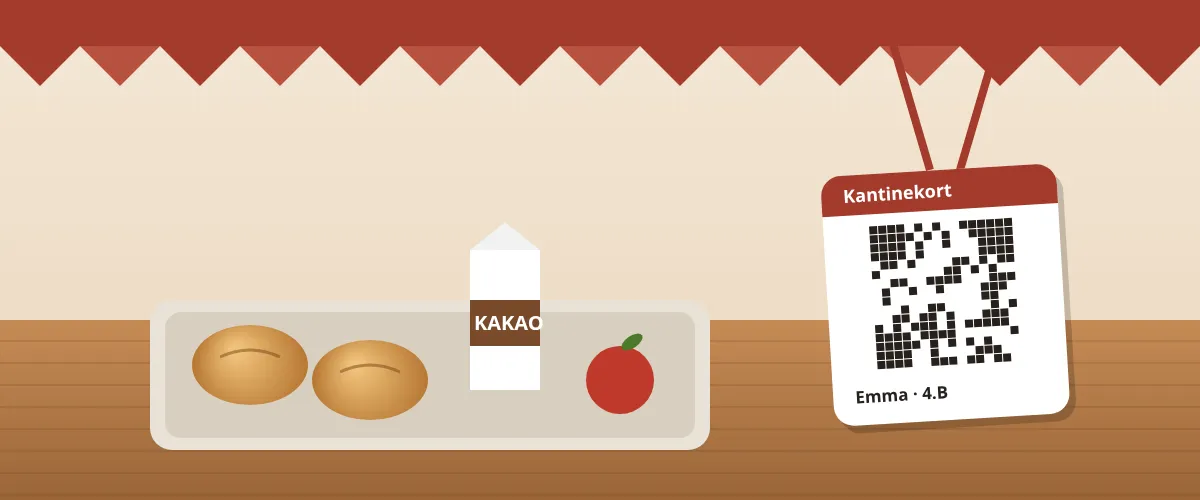
The staff tap in the items or type an amount. The customer shows their card with its QR from the phone's wallet or printed on paper, or pays with MobilePay or card on their own phone.
Ordered ahead, collected with a code
The customer orders for a set day on your page, with or without a card, and gets a pickup code. The kitchen gets the list of what to make day by day, and the till hands out by scanning the code or looking up the name.
The canteen till
Till
Søhøjskolen
Emma · 4.B
KAN-7K9F-2XQD
Balance: DKK 64.00
Spent today: DKK 0.00
Tap what the child is buying.
The parents' phone
The card is scanned, and the child taps what they are buying. Choose whose card is on the counter, and try it yourself.
Whose card is scanned?
The till shows name, class and balance, so it is the right child. Tap an item, and it is taken off at once.
Details
What to know
- Prepaid cards, topped up by anyone with the code
- A card has its own QR and its own balance. Parents, grandparents or the cardholder tops it up with MobilePay or card on your page, and the money is on the card at once.
- Parents manage a child's card
- At a school the child's card belongs to the parents. They set a limit per day or week, can block sweets and soft drinks, see every purchase and block the card if it gets lost. Words like pupil and parent only appear where the cards are children's.
- Or without cards at all
- A café or a staff canteen can run without prepaid cards at all. The customer pays by phone at the till and when ordering ahead, and it becomes the same sale in the report.
- You decide who gets in
- A canteen can be open to everyone, only to those with a code, or only to staff, who sign in with their work email or a staff code.
- The balance is paid back without a fee
- If the cardholder wants the money on the card back, they ask for it on the card's own page, at any time and without a fee. The money goes back the way it came.
- VAT and vouchers
- A school's own canteen can sell VAT-free to pupils, while staff purchases carry VAT. The report gathers sales, VAT, top-ups and refunds, with the vouchers for the accountant.
Questions
Frequently asked questions
Can a café or a pizzeria use till and ordering?
Yes, for the menu, the till and ordering ahead for a set day, with payment by phone and no cards at all. Choices on a dish, such as size and toppings, and ordering for as soon as possible the same day are not built yet, and we do not offer delivery.
What does it cost?
A purchase with the card at the till costs nothing, because the money went through Kuvert when the card was topped up. A top-up costs 2 % + VAT in service fee and a handling fee, which whoever tops up pays by default. If the customer pays by phone without a card, it is a sale like any other, and by default the canteen pays the fees, so the price on the menu is the price.
Do cardholders need to download an app?
No. The card is a QR, printed on paper or saved in Apple Wallet or Google Wallet, and everything else happens on your page in the browser.
Can it run alongside the rest of Kuvert?
Yes. The till and the ordering live in the same shop as your gift cards, tickets and tables, and you switch on only what you need. A canteen that only uses the till sees only the till in the dashboard.
In the docs
Other features
All products- Gift cardsAn amount, a greeting and a code
- Punch cardTen punches on one card, not an amount
- Corporate giftsThe company buys for the whole list
- TicketsNights, tiered prices and the door
- Table bookingThe restaurant's tables and the club's booths
- CampaignsA bonus for a period, or a code
- On your websiteThe purchase opens in an overlay on your site
- Payments and payoutsMobilePay, and the money to the bank
- Redemption and scannerScan the code, or enter it
- The Kuvert appOn the home screen, no App Store
- AccountsFigures your accountant can reconcile
- Add-ons and cloakroomCloakroom and extras on the ticket
- Payment linksA link by email for a phone order
- WebsiteWith the shop built in
Try it on your own site.
Create the shop, connect Stripe and add your products. No monthly fee on sales and no lock-in.
Would you rather have help, or do you need a website? See how we help