Skip to content

Industry

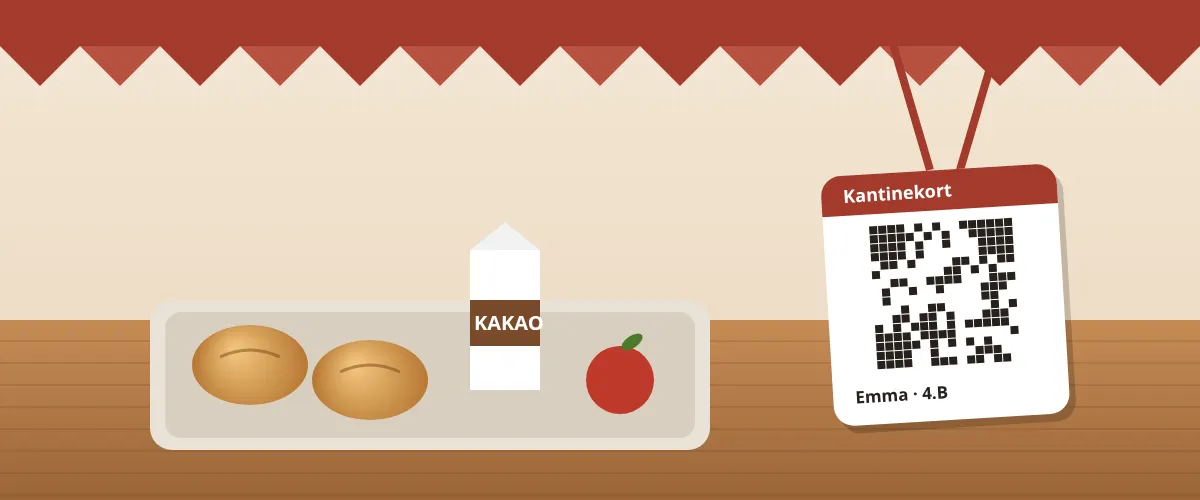
Canteen cards for the school, on paper or on the phone.

Parents put money on the child's canteen card from the canteen's own page, and the child pays with a printed card or with a phone. The till takes the card with a single scan, teachers unlock their own prices with their work email, and the kitchen gets a list of the day's pre-orders. The money is in the canteen's own Stripe account as soon as it is paid.

KuvertCanteen card

DKK 42.00

Emma, 4B

Balance

KAN-8QF2-2K9D

Show the QR code at the till.

Top up

Anyone who has the card's code can top up. This is only an example. See the scenarios

Balance: DKK 42.00.

01

Recognise it?

Situations you know

This is the day-to-day Kuvert has to handle.

The child has no phone
The canteen card is a QR code, and it works just as well on paper. The canteen pastes in the class list and prints the cards the size of a payment card, ready to cut out, and they go home in the school bag. If the child has a phone, the card can also sit in Apple Wallet or Google Wallet with the balance on it.
Grandma wants to top up
Anyone who has the card's code can top up with MobilePay or a card. The page shows only the child's first name and the school, so grandma can see it is the right child, and the parents get an email saying money has come in.
No sweets, and DKK 40 a day at most
The parents set a limit per day or per week and block the categories they do not want to pay for, e.g. sweets. The till says no straight away and says why, so the child is not left waiting while the queue grows.
The break is 30 minutes, and the queue is long
The till shows the canteen's items as buttons. The child shows the card, the till scans it and sees the name, class, balance and what has been ordered in advance, and one tap pays. If something is not on the menu, the till keys in a different amount.
Teachers need a staff price
The canteen enters the school's email domain. A teacher enters their work email and gets a link, or uses the school's staff code. Then they see the staff prices and the items only staff can buy, and get their own canteen card, which the till recognises as staff.
Lunch has to be ordered in advance
The parents order lunch from their page up to 7 days ahead, and by default until 9.00 on the day. The money is taken straight away, and a cancellation before the deadline puts it back on the card. The kitchen gets a list per day with the number of each dish and a packing list per child, and at the till staff tap «Udlever» (hand out) when the child collects the food.
Show all 8
The card has been lost
The parents block the card from their own page, and the till refuses it straight away. If they make a new one, the balance, the limits and the pre-orders move over, and the old card no longer works.
The child changes school
The parents tap «Get the money back», and whatever is on the card is sent back free of charge to the payments it came from. If part of the balance was put in as cash at the canteen, it shows on the canteen's dashboard as an amount the canteen pays back itself.

The canteen till

Till

Søhøjskolen

Emma · 4.B

KAN-7K9F-2XQD

Balance: DKK 64.00

Spent today: DKK 0.00

Tap what the child is buying.

The parents' phone

The card is scanned, and the child taps what they are buying. Choose whose card is on the counter, and try it yourself.

Whose card is scanned?

The till shows name, class and balance, so it is the right child. Tap an item, and it is taken off at once.

02

What matters most

What matters most for school canteens

A card that does not need a phone
The printed card is the child's means of payment, and the phone is optional. Both show the same code, so the till treats them the same.
MobilePay
Parents and grandparents top up with MobilePay or a card, without an app and without creating an account.
The parents' own limits
A limit per day or per week, blocked categories and an email when the balance runs low. Both parents can follow the same card.
The staff's own door
Work email or staff code. Teachers get staff prices on the same food and their own selection, both at the till and in the shop.
Pre-orders and the kitchen's list
Ordered and paid from the card before the deadline. The kitchen sees how much to make for each school and can print the list.
VAT per sale
Each school has its own setting for VAT on pupil sales, and sales to staff carry 25% VAT. Every purchase records its VAT, and the report can be downloaded as a CSV for the accountant.
Several schools in one shop
Each school has its own page and its own staff code, and can have its own items. The money from all of them lands in the same Stripe account.
03

See it in use

Open Skolekantinen

Skolekantinen is our demo for school canteens: a fictional business with a real Kuvert shop behind it. The website is theirs, and the button is ours. The shop is in test mode, so you can click around without a single krone being charged. The other industries are alongside.

School canteen

Skolekantinen

Lunch and rolls at two schools

Two school canteens where parents top up their child's canteen card, the child pays with a printed QR code or a phone, and lunch can be ordered the day before.

04

Questions

Frequently asked questions

What does it cost?

There is no monthly plan. A top-up on a canteen card costs a 2% + VAT service fee and a DKK 5.00 handling fee per top-up. By default the canteen pays the service fee, and the person topping up pays the handling fee. You choose who pays what. Sales at the till cost nothing.

Do the children need a phone?

No. The printed card is enough, and many schools have no phones in lessons. If the child has a phone, the card can also sit in Apple Wallet or Google Wallet, but that is optional.

Can parents get their money back?

Yes, at any time and with no fee. The parents tap «Get the money back» on their page, and the money goes back to the payments it came from. Money put in as cash at the canteen is paid back by the canteen itself, and Kuvert shows the canteen how much.

How do teachers get access?

You enter the school's email domain, or make a staff code, or both. A teacher who uses their work email or the code counts as staff on that device for half a year and sees the staff prices and the staff's own items. Without access, those items can be neither seen nor bought.

What is the smallest amount you can top up?

A new school accepts top-ups from DKK 50.00 upwards. Each school sets its own smallest and largest amount and the amounts the page suggests.

What does Kuvert know about the children?

The name and, if you enter it, the class. The children have no login, and it is the parents who create and manage the card. When a card is closed, the name is deleted 13 months later, while the bookkeeping stays.

How do we get started?

Kantine is switched on for each shop by Kuvert. Write to us and we will open it, and you create the schools, the menu and the cards from the dashboard.

Set up your shop this week.

Create the shop, connect Stripe and add your products. No monthly fee on sales and no lock-in.